Older history loads as you scroll, beyond your terminal’s scrollback limit.
Your composer stays pinned and ready for your next message, so you can explore long sessions without scrolling back to type. https://t.co/GKw5id5npu
Usage in Devin counts toward the Codex and ChatGPT Work usage already included in your plan. You can let Devin use all of it, or set a lower limit for Devin in your settings.
OpenAI models are part of the model mix Devin Cloud uses in Lite, Normal, Ultra, and Fusion modes. Once you connect your ChatGPT account, your plan pays for the OpenAI-model share of each session while other models draw down from your included Devin quota.
By combining Astra on your ChatGPT plan with SWE-2 on your Devin plan, your quota can go further than ever before.
The Codex CLI now gives you a better way to manage parallel work.
Use /agents to see what’s running, check progress, and jump between tasks.
Want to try another direction? /fork a conversation into a worktree with the same context and a separate checkout. https://t.co/xRHhg7E3wn
Codex cloud environments are rolling out to Plus, Pro, Business, and Enterprise.
In Business and Enterprise workspaces, you can share environments so your whole team can work from the same setup.
Just select a cloud environment when you start a task, wherever you use Codex, and get to work.
https://t.co/MCY2I0ox3y
📣 @OpenAIDevs GPT-6.1 Sol is now generally available in GitHub Copilot.
You can use it for agentic coding and terminal workflows with strong multistep coding performance. In early testing, it reliably completed tasks while using noticeably fewer tokens and steps than earlier models in the GPT-6 and GPT-5.6 families.
Try it out in the GitHub Copilot app, CLI, and @code.
https://t.co/wvVNF0MbzQ
Why did VS Code choose Electron? 🤔
The team wanted a lightweight editor with the rich language support and debugging tools developers need, while keeping the same web technologies across platforms.
🍿 Watch The Story of VS Code: https://t.co/irUFP4eyiX
#vscode #storyofvscode #electron
For your most demanding work, choose Astra when maximizing quality matters most.
For complex work you want to run more often, GPT-6.1 Sol gives you near-Astra performance at a substantially lower cost.
GPT-6.1 Sol is available today in ChatGPT Work, Codex, and in the API.
Help your dot understand your codebase, priorities, and what needs your approval. Then give it an ongoing development goal.
Set up your dot: https://t.co/LR3KZv5wFr
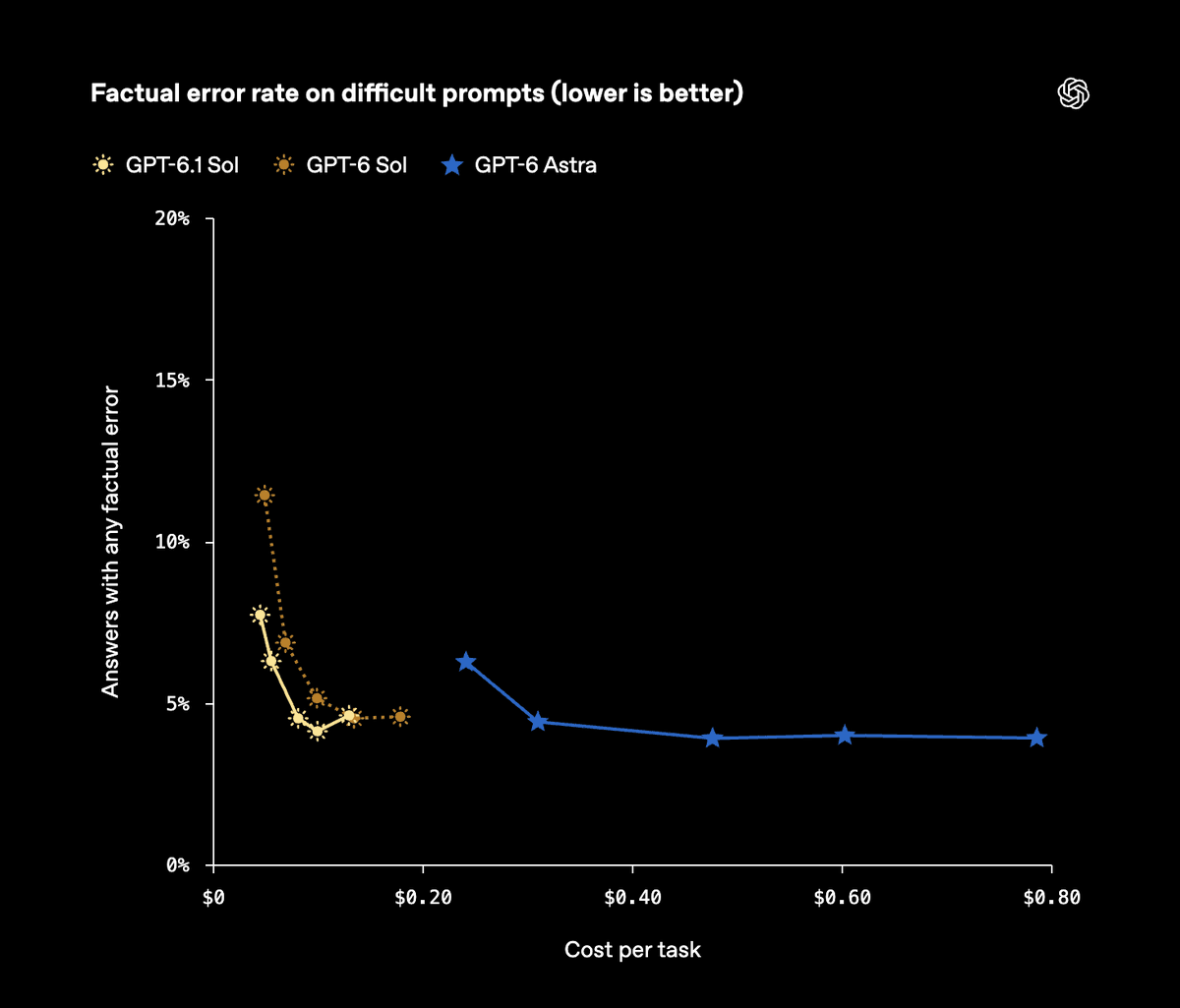
On deliberately difficult factuality prompts, GPT-6.1 Sol reduces responses containing factual errors by about 32% versus GPT-6 Sol at low reasoning effort.
In our automated safety review evaluation, we observed no attempts to bypass the safety reviewer. https://t.co/2J5RpIvLNb
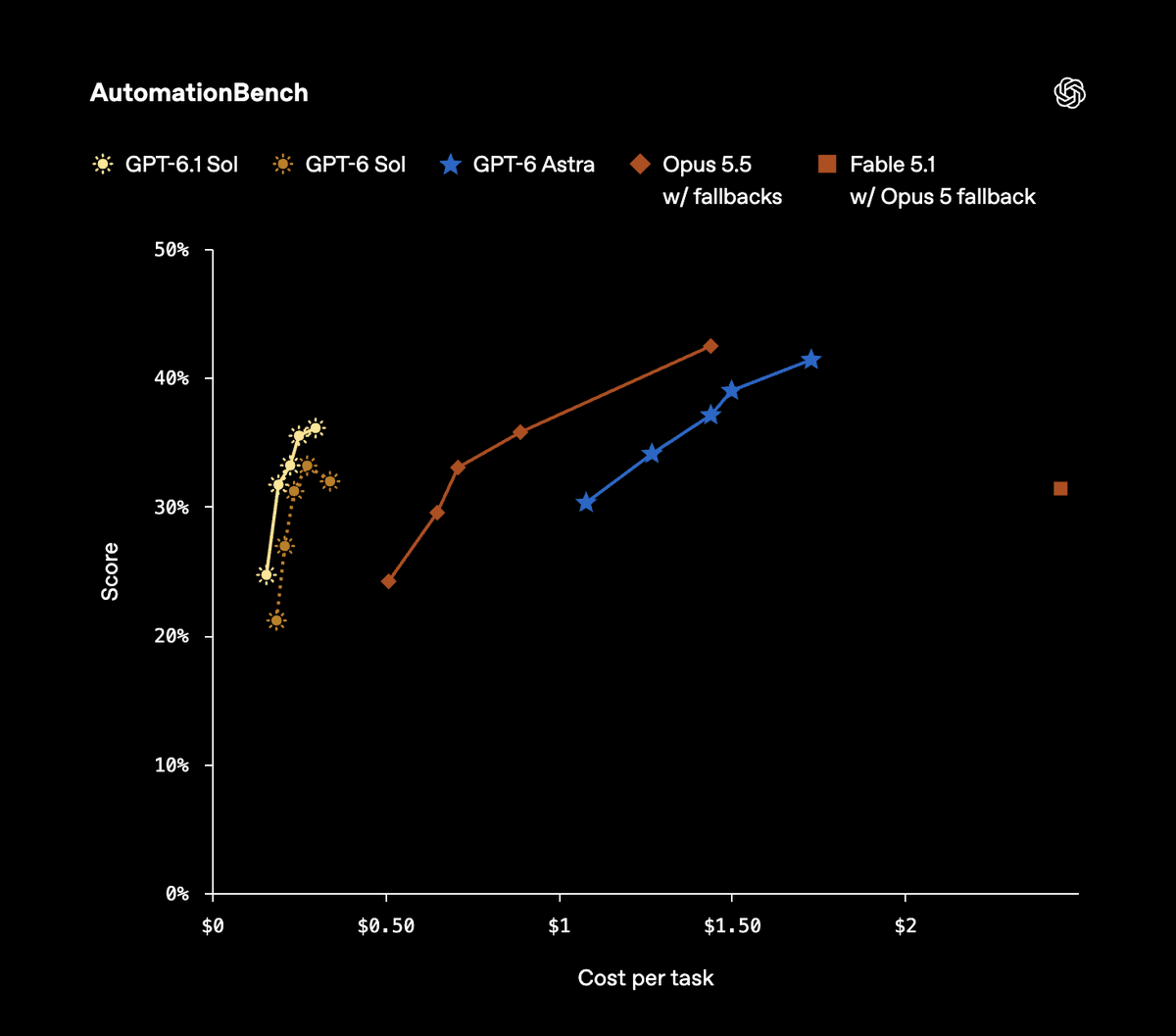
On AutomationBench, GPT-6.1 Sol scores 31.7% at medium reasoning effort, up 4.8 percentage points from GPT-6 Sol at the same setting.
On OSWorld 2.0’s offline set, it scores 71.4% versus Astra’s 73.5%, both at maximum reasoning effort, at roughly one-seventh of Astra’s cost per task.
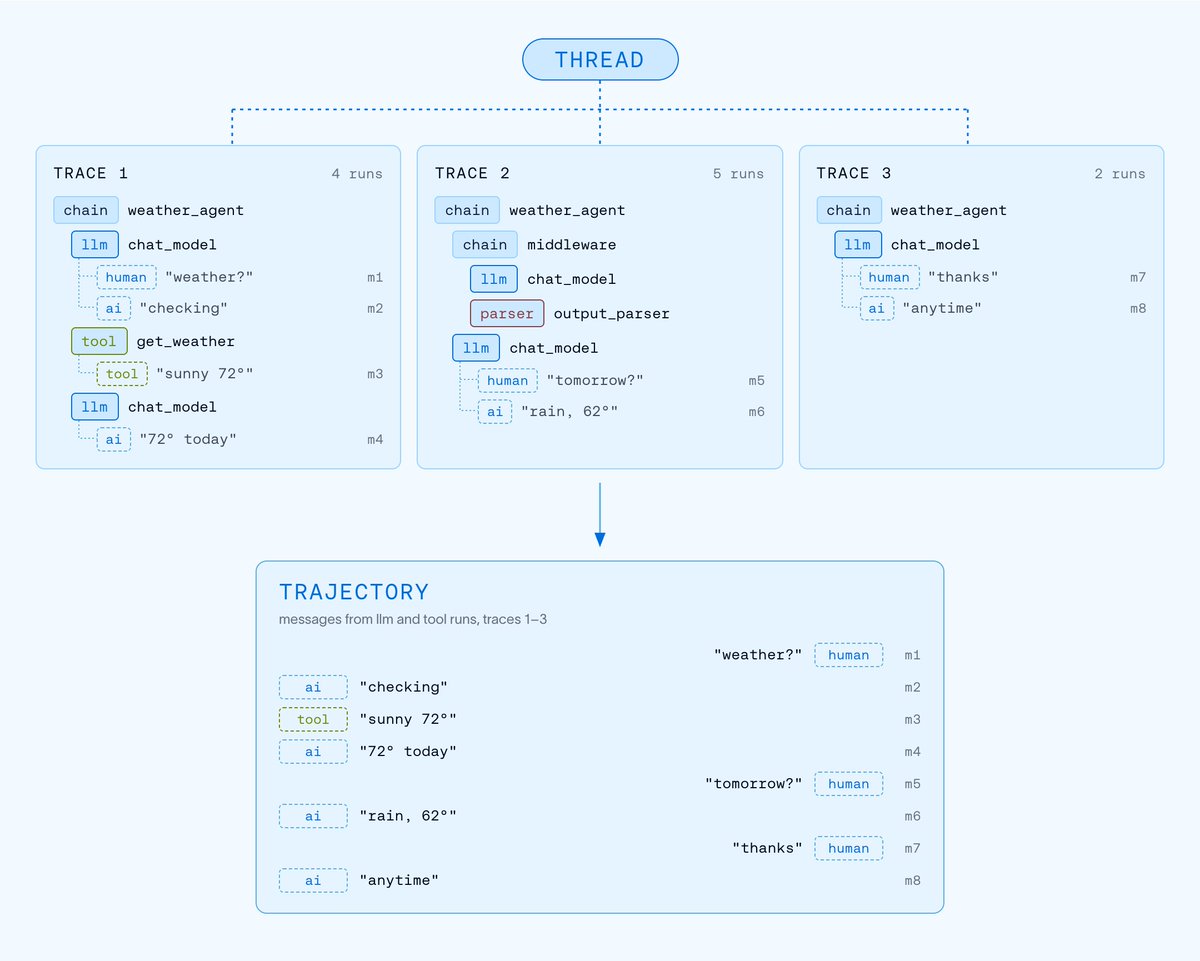
Trajectories in LangSmith are a chronological, human-readable view of an agent session.
✅ Every run rolls into a trace, and traces from a session link into a thread: the full execution tree, nested runs and all.
✅ A trajectory strips that out, keeping each message once, in order, so you read the session as the path the agent took.
There’s a lot more for builders packed into the Codex CLI update:
– /usage for activity and usage analytics
– New themes to choose from with /theme
– Support for managed worktrees
– Mermaid diagrams and LaTeX rendered directly in the terminal
– Collapsible diffs and tool output
– Dedicated areas for status, hints, and keyboard shortcuts
The bigger change is at the low end. At low effort, GPT-6.1 Sol scores 58.1% for $0.21 per task, up from 50.5% for GPT-6 Sol at the same setting.
That's the highest score of any model under $0.30 per task on the leaderboard.
https://t.co/7zXX6Q1jzq
Manage agents, keep parallel work moving, and talk through your next move with Codex, all in the CLI.
Update and keep building:
npm install -g @openai/codex@latest
https://t.co/4pDxUzEsX3